Using R to Teach R: Lessons for Software Development
As we approach the decennial (10-year) anniversary since Jumping Rivers was founded in 2016, it’s a good time to reflect on what we have achieved in that time and share some lessons learned.
If you have read our blogs previously then you will be aware that Jumping Rivers is a consultancy and training provider in all things data science. But did you know that we offer over 50 different courses spanning R, Python, Git, SQL and more?
In this blog we will provide a glimpse into our internal process and share how we have streamlined the task of maintaining so many courses. Along the way we will share some good practices applicable to any big coding project, including packaging of source code and automated CI/CD.
The challenge
Let’s start by laying out the key challenges which face us.
1. Multilingual support
Our course catalogue consists of over 50 courses. The majority of these are either based on R or Python or both:
- 50% R
- 30% Python
- 5% R and Python
- 15% other (Git, SQL, Tableau, Posit and more)
At the very least, any solution that we come up with for standardising our courses must be compatible with both R and Python. Ideally it should also support some less taught languages including SQL and Git.
2. Maintenance
The world of R and Python is constantly changing. The languages themselves receive frequent updates, as do publicly available R packages on CRAN and Python packages on PyPI.
This has the consequence that code which worked one year ago (or even one day) may no longer be functional with the latest package versions. We will need some way to track this and ensure that the code examples covered in our courses remain relevant and error-free.
3. Demand
We deliver over 100 courses per year. For a relatively small team of data scientists, this can be a lot to juggle!
In an ideal world, the process of building the course materials, setting up the cloud environment for training, and managing all of the administration that goes along with this should be automated. That way, the trainer can focus on providing the highest quality experience for the attendees without having to worry about things going wrong on the day.
The solution
Our team is used to setting up data science workflows for clients, including automated reporting and migration of source code into packages. We have therefore applied these techniques in our internal processes, including training.
Automated reporting
You write a document which has to be updated on a regular basis; this might include a monthly presentation showing the latest company revenues. Does this scenario sound familiar?
We could regenerate the plots and data tables and manually copy and paste these into the report document. Even better, we can take advantage of free-to-use automated reporting frameworks including R Markdown and Quarto.
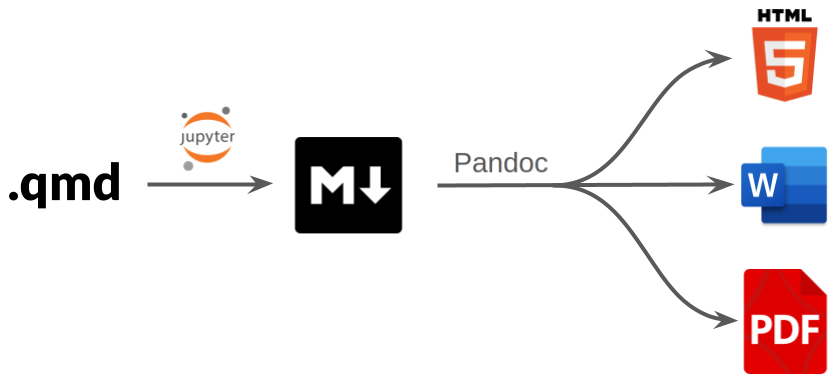
R Markdown and Quarto both work as follows:
We provide a “YAML header” at the top of the report document with configuration and formatting options:
---
title: "Introduction to Python"
authors:
  - "Myles Mitchell"
date: "2026-04-02"
output: pdf
---
The report body is formatted as Markdown and supports a mixture of plain text and code:
## Introduction

At it's most basic, Python is essentially a calculator.
We can run basic calculations as follows:

```{python}
2 + 1
```

We can also assign the output of a calculation to a
variable so that it can be reused later:

```{python}
x = 2 + 1
print(x)
```
Notice that we have included chunks of Python code. By making use of chunk options we can configure code chunks to be executed when rendering the report. Any outputs from the code (plots, tables, summary statistics) can then be displayed.
By migrating the code logic into the report itself, we can update our report assets at the click of a button whenever the data changes.
We have taken inspiration from this approach with our course notes and presentation slides. This forces us to be rigorous with the code examples. Any runtime errors that are produced by faulty or outdated code would be visible in the course notes and by extension to the attendees of our courses.
Crucially for us, R Markdown and Quarto are both compatible with R and Python. They also support syntax highlighting for languages like Git and SQL, as well as a variety of output formats including HTML and PDF.
Internal R packages
So we have settled on a solution for building our course notes. But we have 50 different courses, and setting these up from scratch each time is going to get tedious!
A good practice in any coding project is to avoid duplication as much as possible. Instead of copying and pasting code, we should really be migrating code into functions which are self contained, reusable and easy to test. This will mean fewer places to debug when things inevitably go wrong.
Following a similar philosophy for our training infrastructure, we have migrated any reusable assets for our courses—including logos, template files and styling—into a collection of internal R packages.
When building a new course, the developer can now focus on the aspects that are unique to that course:
- Code examples
- Notes
- Exercises
- Presentation slides
Everything else is taken care of automatically:
- The appearance of the course notes and presentation slides.
- Build routines including converting the R Markdown / Quarto text files into HTML.
In addition to course templates, we also have internal packages for managing the administrative side of training, including:
- Calculating pricing quotes for clients.
- Generating post-course certificates.
- Spinning up a bespoke Posit Workbench environment for the course.
- Summarising attendee feedback.
And the list goes on!
GitLab CI/CD
With automated reporting and packaging of source code, we have created standardised routines that can be applied to any of our courses.
This does not change the fact that we have over 50 courses to maintain. We still need a way of testing our courses and tracking issues. This is where CI/CD (Continuous Integration / Continuous Development and Deployment) comes in.
CI/CD defines a framework for software development, including:
- Automated unit testing.
- Branching of source code and code review.
- Versioning and deployment of software.
If you maintain software then you have likely come across version control with Git. Cloud platforms like GitLab and GitHub provide tools for collaborative code development. Not only do they provide a cloud backup of your source code, they also provide the following features:
- CI/CD tools for automated testing, build and deployment.
- Branch rules for enforcing good practices like code review and unit testing.
- Versioning and tagging of source code.
Each of our courses is maintained via it’s own GitLab repository. The CI/CD pipelines for our courses are defined in a separate repository along with the internal R packages mentioned above.
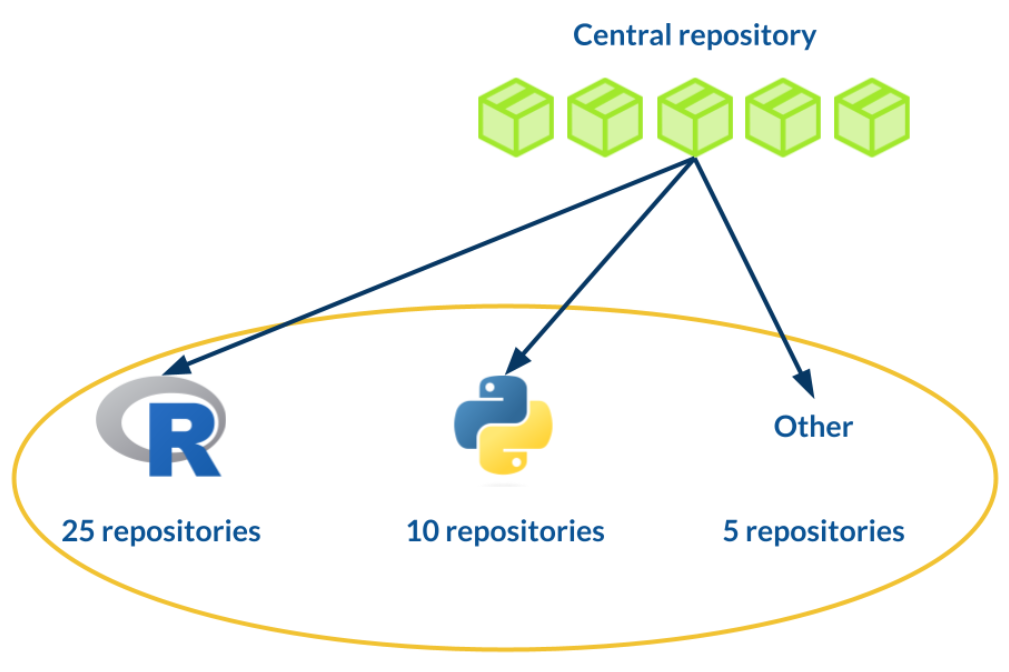
When setting up a new course, the course repository will be automatically populated with the template CI/CD rules. All courses are therefore subject to the same stringent checks, including:
- Ensuring that the course notes build without errors.
- Enforcing code review of any course updates before these are merged into the main branch.
- Building and storing the artifacts (the rendered HTML notes and coding scripts) for the latest version of the course.
These checks are triggered by any updates to a course. We also schedule monthly CI/CD pipelines for all courses, with any issues immediately flagged to our trainers.
We have also taken advantage of GitLab’s folder-like structure for organising code repositories. Within the Jumping Rivers project on GitLab, we have a subproject called “training”. All of our course-related repositories are located “downstream” from this project. This means that any settings or environment variables defined at the “training” level are automatically applied to all of our courses.
In summary
The take-home lessons from this blog are applicable to any big coding project:
- Avoid duplication: migrate any reusable logic or assets into standalone packages.
- Utilise CI/CD workflows using GitLab, GitHub or similar.
- Focus on what matters by automating as much of the process as possible.
Our training infrastructure has taken 10 years to build and is still constantly evolving; we have not even covered the full process in this blog! For a deeper dive, check out this talk by Myles at SatRdays London 2024.
For more on automated reporting, check out:
For more on packaging of source code, check out:
- Writing a personal R package.
- Three-part series: Creating a Python package.
- Four-part series: R package quality.