
What's New in Python 3.15?

It’s October, so that means a new stable release of Python has arrived. Here we will review some of the changes introduced in Python 3.15.
Prominent changes in Python 3.15 that we will cover:
- profiling & statistical sampling
- lazy imports
- unpacking * in for comprehensions
Our highlights from the Python 3.14 release can be found in our 2025 blog post.
Profiling
Profilers are wonderful tools. Imagine you have spent days working on a processing pipeline and it works fine on your test cases and a sample of your real data, but when you attempt to process your real data it takes far too long or uses up too much memory. Profilers can help you tease apart why that happens (along side benchmarking tools and the debugger).
Python has had two core modules for time-based profiling, profile and cProfile, implemented in
Python and C, respectively.
These are event-based profilers that log which functions get called, how long and how often those
functions run for, and so on.
The cProfile module has lower overhead than profile.
There are additional third-party profilers available for Python projects.
There is an alternative way to profile code, using sampling rather than mapping out an event-graph
of function calls.
Sampling profilers look at the active function calls at regular intervals, providing a statistical
summary of which parts of a program are busiest.
A new sampling profiler (called Tachyon) has been introduced in Python 3.15, through the
profiling.sampling module.
Sampling has much lower overhead than event-based profiling, so it is possible to use
profiling.sampling to study running, or even production, Python processes.
In Python 3.15 profile has been deprecated (for removal in 3.17).
The cProfile module remains, but it is now recommended that you access it via a new module,
profiling.tracing, that makes Python’s base profilers more consistent.
We’ll make a new project using uv that uses Python 3.15 (here, a pre-release version).
You can find more information on using uv in last year’s
pre-release blog post.
mkdir -p ~/temp/
cd ~/temp/

uv python install 3.15
uv init blog-py315 --python=python3.15

cd blog-py315
Into that project, we add a simple Python script that:
- makes a list of lists of numbers,
- defines a function to flatten the nested data structure into a single list
- and then calls that function
# Save as `flatten.py`
import random
random.seed(8312253659)

# 100_000 lists of the form [0, 1, 2, ...]
n = 100_000
data = [
    list(range(0, random.randint(1, 10)))
    for _ in range(n)
]

def flatten(xs: list):
    flattened = []
    for x in xs:
        flattened = flattened + x
    return flattened

flattened = flatten(data)
print(flattened[:20])
Now we have a few ways to profile the code in this script.
With profiling.tracing, we can profile it from the command line:
# Takes around 60 secs
uv run python -m profiling.tracing flatten.py
This gives the following output:
[0, 1, 2, 3, 4, 5, 6, 0, 0, 0, 1, 0, 0, 1, 2, 3, 4, 0, 1, 0]
         660961 function calls (660931 primitive calls) in 71.287 seconds

   Ordered by: cumulative time

   ncalls  tottime  percall  cumtime  percall filename:lineno(function)
      3/1    0.000    0.000   71.287   71.287 {built-in method builtins.exec}
        1    0.072    0.072   71.287   71.287 flatten.py:1(<module>)
        1   71.063   71.063   71.063   71.063 flatten.py:12(flatten)
     ....
You can also use profiling.tracing.run("function(arg)") from inside a Python interpreter or
Jupyter session.
profiling.sampling can also run against a batch job from the command line, either giving a live
update (with the option --live) or giving results at the end of the run.
uv run python -m profiling.sampling run flatten.py
[0, 1, 2, 3, 4, 5, 6, 0, 0, 0, 1, 0, 0, 1, 2, 3, 4, 0, 1, 0]
Captured 73,108 samples in 73.11 seconds
Sample rate: 1,000.00 samples/sec
Error rate: 0.08
Profile Stats:
       nsamples   sample%   tottime (s)    cumul%   cumtime (s)  filename:lineno(function)
    72997/72997      99.9        72.997      99.9        72.997  flatten.py:15(flatten)
          38/51       0.1         0.038       0.1         0.051  flatten.py:7(<module>)
            6/6       0.0         0.006       0.0         0.006  ~:0(<GC>)
            ...
A valuable addition is to be able to connect to a running process and sample the python calls within it. To illustrate, we start the script running as a background process from one shell:
source .venv/bin/activate
python flatten.py &
[1] 15972
… and then connect to it from a different shell, using its process ID (PID):
sudo uv run \
  python -m profiling.sampling attach --live 15972
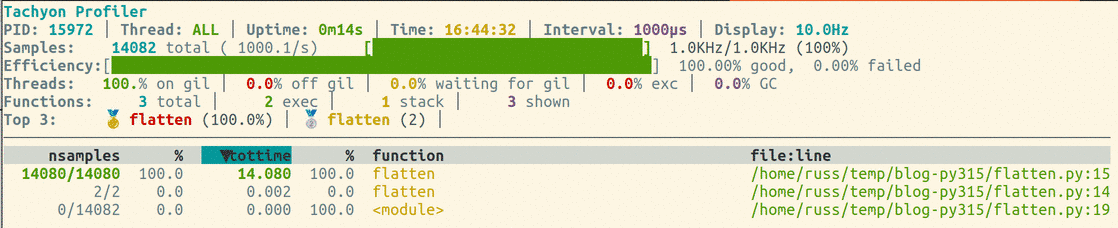
There are a couple of side notes to that last example.
Normally, when we start a python script or app in a uv project, we use
uv run ...commands..., and indeed, we could have used
uv run python flatten.py to start the flattening script running.
But we need to know the PID for the python process that is running the script if we are to profile
it, and the PID output by uv run python ... isn’t the same as the PID for the python process
that it starts.
We also had to start the profiler using superuser privileges sudo uv run ....
This was needed because the profiler must be able to send messages to the process that it is
profiling.
If you forget to use sudo, Tachyon will print out an error and a solution.
This was a simple example, but I’m sure you could imagine the value of this new profiling tool when working with long running data-processing steps or applications.
Lazy Imports
So we can profile our code. Doing this might identify parts of your modules where you can improve running speed. But what if your project is slow, and it isn’t the fault of your own code?
Loading modules can be a time-consuming process in Python, and the time-taken to load a module could depend on many factors:
- how was the module/package installed,
- how big/complex is the module,
- how much of the module do you need to load,
- whether the module has already been loaded within the session,
- and whether the module has already been compiled to byte-code.
If you are loading modules that aren’t needed at run-time, or that are only needed in a specific branch of your code, you could reduce loading time by only loading the packages that are needed.
Tools like Flake8 and Pylint can help you identify modules that are loaded, but which aren’t explicitly used by your code.
A trend in Python development over the past 5 years is to include type annotations in source code, for example, to clarify the expected input and output arguments of a function or method. Types are rarely needed when running code (though runtime type checkers do exist). Instead, the type consistency of your code is checked statically, during development using a tool like Mypy.
Type-checking introduced a small hiccup into the Python module imports system. Let’s say you’ve put a function in a module, and that function takes either a Polars or a Pandas data-frame, and returns a data-frame:
# my_module.py
def summarise(x: pd.DataFrame | pl.DataFrame) -> pd.DataFrame | pl.DataFrame:
    summary = ...
    return summary
The summary = ... statement could use any data-frame methods, and at runtime you may not even
need to import Pandas or Polars when my_module is imported.
But, when you run mypy (or similar) you need the type definitions available.
A simple solution that would make the types available to mypy is to import both Pandas and Polars
into the module.
That may slow down the loading of my_module at runtime.
Now, this isn’t a huge issue: if a data-frame is constructed as part of your project, Pandas or
Polars will probably get loaded at some point.
But if my project is Polars-specific and uses my_module, I shouldn’t have to load Pandas to make
it work.
So, naively adding type-hints to a Python project can complicate the import-dependency graph.
In some projects, adding hard imports to satisfy type-hinting may not be possible because it can lead to circular dependencies between modules and we have used a guarded import to solve this case in the past:
from typing import TYPE_CHECKING

if TYPE_CHECKING:
    import my_dependency_hell
Python 3.14 introduced an approach that simplified this. It was so subtle, I didn’t understand it’s significance, and left it out of last year’s round up of Python 3.14…
You can now import modules in what looks like a circular way:
# --- python 3.14+ (or load `annotations` from __future__)
# account.py
import user
class Account:
    user: user.User
# user.py
import account
class User:
    accounts: list[account.Account]
The dependency between the account.py and user.py modules is solely in the type annotations.
Those type annotations are now evaluated lazily, so it doesn’t matter whether there is an
account.Account class available when python loads the user.py module.
If we import account first, then an incompletely-loaded account entry gets added to
sys.modules.
During evaluation of account.py, import user is called, so Python jumps over and evaluates the
content of user.py.
When it sees import account, Python is aware that account is already in sys.modules and
knows that it is either completely loaded or is in the process of being loaded.
So long as the objects in account are only referred to within the type annotations of user.py,
Python doesn’t notice any circular dependency issue.
The lazy annotations introduced in Python 3.14 mean we no longer need the if TYPE_CHECKING guard
when loading modules.
How much lazier can we be? Well, Python 3.15 has introduced laziness to module/package loading.
In the previous example, we were able to load two mutually-dependent modules since the dependency
between them was within type-annotations, which are now lazily evaluated.
Nonetheless, the loading of these two modules was ’eager’: when you call import account from a
Python session, account.py is run top-to-bottom eagerly (loading its dependencies being part of
that process) and only returns to your session when it is completely loaded.
There may be branches in your code that don’t get evaluated every time that your project is run.
These branches could be explicit (e.g., the use of matplotlib’s plt package, below) or implicit
(whether Pandas or Polars methods are called on the input data-frame).
Assume that the summary = code uses data-frame methods common to the Polars and Pandas APIs.
import matplotlib.pyplot as plt
import pandas as pd
import polars as pl

def summarise(
    df: pd.DataFrame | pl.DataFrame,
    show_figure: bool = False,
) -> pd.DataFrame | pl.DataFrame:
    summary = ...  # process the data-frame

    if show_figure:
        plt.plot(summary["temperature"], summary["ice_cream_sales"])
        # ...
        plt.show()

    return summary
Let’s say my data is a Pandas data-frame, that I’ve already loaded.
If I load the summarise function from a module, it could load MatplotLib and Polars, even though
I might not use them.
Instead, let’s rewrite the summarise module, to lazily load the three dependencies.
# Python 3.15+
lazy import matplotlib.pyplot as plt
lazy import pandas as pd
lazy import polars as pl

def summarise(
    df: pd.DataFrame | pl.DataFrame,
    show_figure: bool = False,
) -> pd.DataFrame | pl.DataFrame:
    summary = ...  # process the data-frame

    if show_figure:
        plt.plot(summary["temperature"], summary["ice_cream_sales"])
        # ...
        plt.show()

    return summary
Now, when I load that module, none of the ’lazy’ dependencies will be loaded until they are actually used.
If I call summarise(df, show_figure=False) with a Pandas data-frame, what will happen?
All of the MatplotLib functions are within the if show_figure block, and so won’t get evaluated.
As such MatplotLib won’t get imported (unless some other code in my project has loaded it).
Interestingly, even though we have pl.DataFrame in the df type-annotation, Polars won’t get
imported either.
The data-frame is a Pandas data-frame, and is processed using Pandas methods.
Nothing in the code accesses the type-annotation metadata, and we know that type-annotations are
lazily evaluated (from Python 3.14, above) and so aren’t queried by Python at run-time unless forced
to.
Since no Polars-derived code is run, and polars is lazily imported, that whole package isn’t
loaded.
Lazy loading seems a valuable idea. But eager loading remains the default, and when a package/module import fails you will find out when you try to load it. With lazy loading, packages are fully-loaded when they are first used. So, be aware that when package/module-loading is lazy you may get error messages at strange times.
Unpacking in Comprehensions
Some of you may have winced when I defined the flatten() function above.
This loop creates a new list at each iteration - it is hugely inefficient:
# `xs` is a list
flattened = []
for x in xs:
    flattened = flattened + x
There are quicker and more memory-efficient ways of implementing it, using Python syntax that already exists:
flattened = []
for x in xs:
    flattened.extend(x)

flattened = [item for sublist in xs
                  for item in sublist]
I’ve always found nested comprehensions a little hard to follow. But tastes vary.
Python 3.15 has introduced some nice syntax for unpacking nested lists:
flattened = [*x for x in xs]
The *x unpacks each sublist’s elements.
Set and dict comprehensions have picked up the same trick. {*x for x in xs} unions together the
sets in xs, and {**d for d in ds} merges together the dicts in ds - so if flattening isn’t
your problem, but de-duplicating or combining is, the same */** syntax has you covered.
Other News
Python 3.15 has introduced a variety of other changes.
- Error messages are more helpful now - especially if you work across a few different languages.
For example, if you attempt to
my_list.push(x)an element you might think you’re working in JavaScript for a second. Python now has a translation table that gives you the correct Python method name (for some commonly used processes). There are also helpful messages if you attempt to access an attribute that doesn’t exist on an object - Python will indicate similarly-named attributes on that object, or its components. - A new, immutable
frozendicttype has joined the builtins. It could be useful if you need a dictionary that can’t be mutated by accident. - UTF-8 is now the default encoding for file I/O, regardless of platform or locale - one less way for a script to behave differently on your machine than on someone else’s.
- And, following on from last year, the command line interface has become even more colourful, with additional modules getting beautified.